Apple Store

BARE FEATS - real world Mac speed tests


MAIN INDEX of latest speed tests


Lost data? We can help!


UltraSharp 2707WFP 27 in Widescreen Flat Panel LCD Monitor with Height Adjustable Stand
Check out the 27" Dell LCD

CS3-PSD-125x125

MAXIMUM MAC PRO:
4GB FB-DIMMs x 8 = 32GB

Originally posted June 21st, 2007 by rob-ART morgan, mad scientist

We learned in recent testing with both After Effects CS3 and Compressor 3 that you can use up 16GB of RAM in a hurry. That's because both apps spawn sub-processes, each grabbing up to 3GB of RAM each.

MONSTER MEMORY MODULES
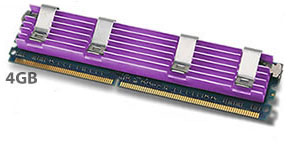
Trans International has come to the rescue of professional Mac Pro users. They are now shipping 4GB FB-DIMM modules for the Mac Pro (in addition to 2GB and 1GB modules).

They sent us samples to try. First of all, they work great. Thirty-two gigabytes of memory. I remember when that was considered a respectable sized hard drive, by crackey!

Do they run hot? No. To our surprise, they ran just as cool as the coolest running 2GB modules we've tested. However, we did notice that the man inlet and exhaust fans in the Mac Pro's CPU bay ran faster.
Normally those fans idle at 600RPM. And when you run a CPU intensive task, they ramp up to 1200RPM. With eight 4GB FB-DIMMs installed, they idled at 1000RPM and ramped up to 1800RPM when we rendered with Compressor 3 in Virtual Cluster mode. Ditto for other CPU intensive, memory grabbing apps.

The GOOD NEWS: That means that the SMC firmware is doing its job. It's adjusting the fan speed to keep the memory cool.

The potential BAD NEWS: The noise level of your Mac Pro is going to be higher. That's not a big deal unless you are doing audio recording in your lab. Of course, the audio production labs I've visited typically put their Power Macs and Mac Pros in a sound proof box or chamber. There's a company in Nashville who makes them for music recording studios. There's also one on the West Coast. Other studios put the Mac Pro in an adjacent room and run the cables through the wall.

WHERE TO BUY 4GB FB-DIMMS
Visit Trans International's website (TransIntl.com) for pricing. You can order online or by phone.

MORE ARTICLES ON THE 8-core MAC PRO versus other Macs

Pure CPU Crunching on the 8-core versus 4-core Mac Pro using Cinebench, Geekbench, Photoshop CS3, Aperture, and QuickTime Player

Multiprocessing (Simultaneous rendering by Final Cut Pro, Motion, iDVD, and Photoshop CS3)

After Effects CS3 -- the first application to use all 8 cores and all 16GB of RAM on the Mac Pro

3D Gaming (Quake 4, Doom 3, Unreal Tournament 2004, Halo, World of Warcraft, Prey) using three different graphics cards

Apple Store

WHERE TO BUY A MAC PRO
If you live in the USA and plan to purchase an APPLE product, please CLICK THIS LINK or any APPLE DISPLAY AD to help us earn our affiliate commission. It's a great way to support Bare Feats.

DON'T LIVE in USA?
Readers in Canada should visit Apple Store, Canada.
Readers in France should visit Apple Store - France.
Readers in Germany should visit Apple Store - Germany.
Readers in Italy should visit Apple Store -Italy.
Readers in the United Kingdom should visit Apple Store - UK.

You can also purchase Apple systems and accessories from Small Dog Electronics. You can configure-to-order through them just like on the Apple Store.

WHERE TO BUY MEMORY FOR YOUR 8-CORE MAC PRO
We have tested the memory from the following companies in our 8-core Mac Pro and can recommend them to you....

We have tested both 2GB and 1GB modules from Other World Computing in our 8-core Mac Pro. They offer a "Trade In Your Factory Memory" REBATE program.

TransIntl.com designed their own heat sinks with 6 cooling fins on each side (versus 4 on the Apple factory modules) using a special aluminum alloy. We have tested their 1GB and 2GB and 4GB modules in our 8-core Mac Pro.

We have tested MaxUpgrades' memory in our 4-core. They assured us that they have tested their memory on their 8-core Mac Pro without any errors and crashes.

WHAT GRAPHICS CARD SHOULD YOU BUY FOR THE 8-CORE or 4-CORE?
We recommend the Radeon X1900 XT

FYI,
The Quadro FX 4500 messes up in Maya 8.5. According to the Alias/Autodesk engineering support "qualified hardware" page, the FX 4500 (and GeForce 7300 GT) fails to render shadows properly in the Hardware Renderer and in the High Quality Viewport. However, there are no problems with the Radeon X1900 XT. That's ironic when you consider that Apple promotes the FX 4500 as the "ideal choice for high-end scientific visualization." Unless you do 3D stereo-in-a-window, we recommend the much-more-affordable Radeon X1900 XT.

Has Bare Feats helped you? How about helping Bare Feats?

© 1995 - 2007 Rob Art Morgan
"BARE facts on Macintosh speed FEATS"
Email , the webmaster and mad scientist